
Quick answer
What do d80, d90 and d95 mean on an LG dryer?
They are LG Flow Sense warnings that the exhaust vent is 80%, 90% or 95% blocked. Clean the lint screen, the duct behind the dryer and the outside vent hood, then run the dryer to clear the code.
LG dryers have a feature called Flow Sense that monitors exhaust airflow. When the vent becomes restricted, the display shows a code starting with d. These aren’t failures of the dryer itself; they’re warnings that air can’t get out properly.
What the Codes Mean
| Code | Meaning | Urgency |
|---|---|---|
| d80 | Exhaust airflow is about 80% restricted | Clean soon |
| d90 | About 90% restricted | Clean before the next few loads |
| d95 | About 95% restricted | Stop and clean now |
The dryer may keep running with these codes, but drying takes much longer, the dryer runs hotter, and the risk of overheating and lint fires goes up. Don’t ignore them.
Safety First
Unplug the dryer or switch off its breaker before moving it or disconnecting the vent.
Step 1: Clean the Lint Filter
Remove the lint filter, clean it, and look into the filter slot with a flashlight. Vacuum out any lint. If the filter has a film from dryer sheets, wash it with warm, soapy water and let it dry completely before reinstalling.
Step 2: Check the Hose Behind the Dryer
- Pull the dryer out from the wall carefully.
- Look for kinks, crushing or sharp bends in the transition hose.
- Disconnect the hose and check for lint build-up inside.
- If it’s thin foil or plastic, replace it with semi-rigid or rigid metal duct.
A crushed hose alone can trigger a d-code, especially if the dryer was recently pushed back against the wall.
Step 3: Check the Outside Vent Flap
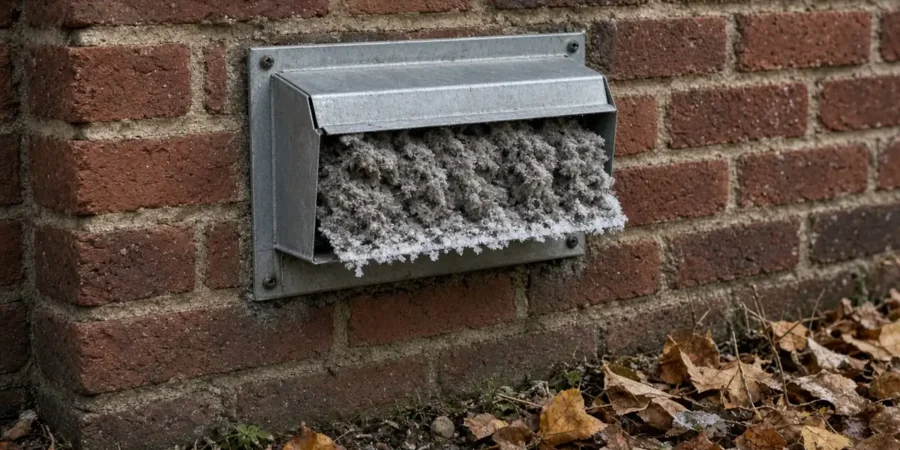
Go outside while the dryer runs. You should feel a strong flow of air, and the flap should open fully. Clear any lint, leaves, nests, or in winter, snow and ice around the hood. A screen over the exterior hood will trap lint and should be removed or replaced with a proper dryer vent hood.
Step 4: Clean the Full Vent Run
If the hose and flap are clear but the code continues, the duct inside the wall or ceiling is likely packed with lint. Use a vent brush kit and work from both ends. Our full guide to how to clean a dryer vent explains each step.
Step 5: Test and Let the Dryer Re-learn
After cleaning, run a normal heated load. The Flow Sense reading updates as the dryer runs, so the code may not clear instantly. If it drops from d95 to d80, you’re making progress, but there’s still a restriction somewhere.
Why the Code Keeps Coming Back
- Vent run too long or too many bends. Each elbow adds resistance. Some long runs, especially in condos or older homes, will always be marginal.
- Undersized or damaged duct inside a wall.
- Lint inside the dryer cabinet, past the filter, where you can’t reach it without opening the machine.
- A condo or shared vent that needs building-level cleaning.
How to Keep d-Codes From Coming Back
- Clean the lint filter before or after every load. It takes seconds and is the single biggest factor in airflow.
- Wash the filter every few months if you use dryer sheets or liquid softener, which leave a film that blocks air.
- Keep the dryer a few centimetres from the wall so the transition hose isn’t crushed.
- Use the shortest, straightest duct possible, with as few elbows as you can manage. Join sections with foil tape and clamps, not screws that catch lint.
- Check the exterior hood seasonally, and after heavy snowfall in winter.
- Have the full vent run cleaned at least once a year, more often if you do a lot of laundry or have pets.
A clear vent doesn’t just stop the warning. It shortens drying times, reduces wear on the heating element and thermal fuse, and lowers the risk of a lint fire.
Other LG Dryer Codes You Might See
| Code | Common meaning |
|---|---|
| tE1 – tE6 | Thermistor (temperature sensor) problem |
| HS | Humidity sensor; try cleaning the sensor bars |
| PS | Improper voltage supply |
| nP | No current reaching the heater |
If your LG is also not heating, read our dryer not heating guide.
When to Call a Pro
Call a technician if the code returns right after a full vent cleaning, if the dryer is overheating or shutting off, or if you see tE, nP or PS codes. We can check airflow inside the cabinet, the blower wheel and sensors, and tell you whether your vent run itself is the limit.
See our LG appliance repair page and our dryer repair service.
Book a repair: call 437-662-1414 or book a visit online. We’re open 7 AM to 11 PM every day, statutory holidays included, at the same price, and we serve Toronto, North York, Scarborough and Etobicoke. The $70 service call is waived when you go ahead with the repair, and our repairs carry a 3 to 6 month warranty depending on the job. We’ve been fixing appliances since 2004 with licensed, insured and certified technicians. Read our 350+ Google reviews.
Frequently Asked Questions
What does d80 mean on an LG dryer?
d80 means LG’s Flow Sense has detected that exhaust airflow is about 80% restricted. Clean the lint filter, check the hose behind the dryer, and clear the outside vent.
Is it safe to use my LG dryer with a d95 code?
It’s not recommended. d95 means the exhaust is about 95% restricted, which makes the dryer run hot and slow. Clean the vent before using it again.
How do I reset the d90 code on my LG dryer?
There’s no separate reset. Clear the restriction, then run a normal load. The airflow reading updates during operation and the code clears when airflow improves.
Why does my LG dryer show d80 after cleaning the vent?
The restriction may be inside the wall duct, at the exterior hood, or inside the dryer cabinet. A long vent run with many bends can also keep airflow marginal.